> For the complete documentation index, see [llms.txt](https://help.vbee.vn/llms.txt). Markdown versions of documentation pages are available by appending `.md` to page URLs; this page is available as [Markdown](https://help.vbee.vn/huong-dan-su-dung/du-an/du-an-thuong/bien-tap-du-an/luu-du-an.md).
# Lưu dự án
Với các dự án chưa Biên tập xong, Khách hàng có thể lưu lại dự án đang biên tập bằng cách bấm vào biểu tượng **Lưu** trên góc màn hình
Khi khách hàng bấm thoát Dự án trước khi lưu, hệ thống sẽ hiển thị cảnh báo Lưu thay đổi trước khi đóng?\
Khách hàng lựa chọn **Lưu và rời đi** để lưu lại Dự án trước khi thoát khỏi giao diện.
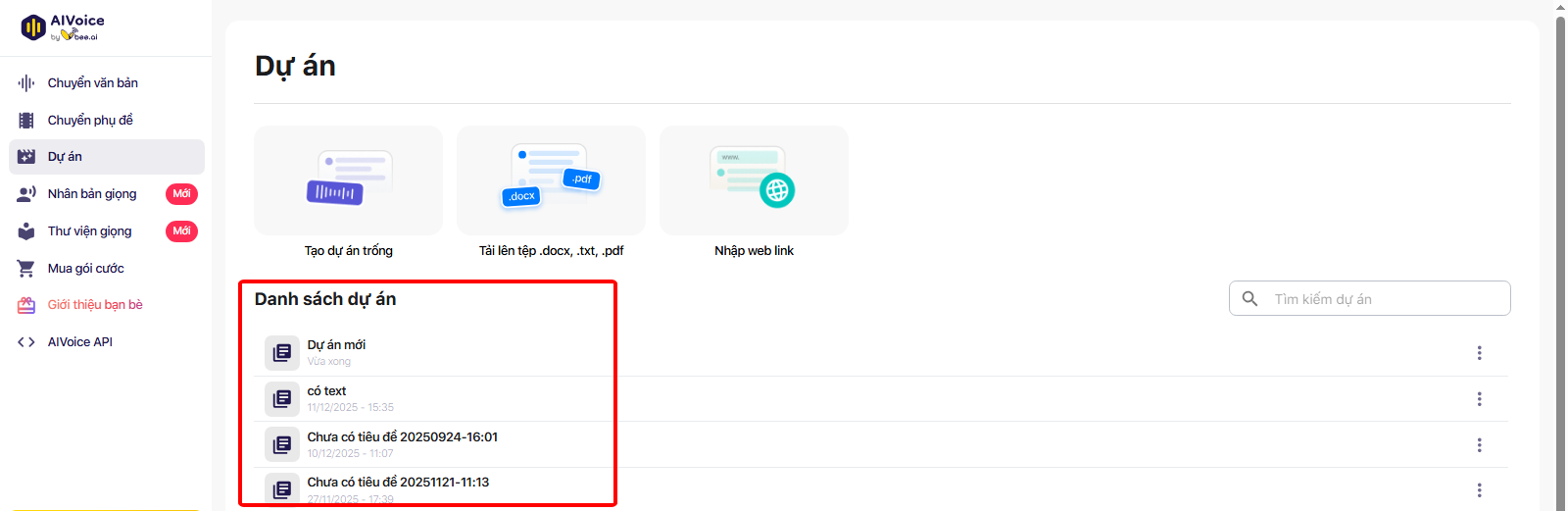
Khi cần tiếp tục biên tập Dự án, ở mục Danh sách dự án, khách hàng bấm chọn vào Dự án cần biên tập để tiếp tục quá trình biên tập Dự án
Khách hàng có thể tìm kiếm dự án theo tên đã đặt tại thanh **Tìm kiếm dự án**