> For the complete documentation index, see [llms.txt](https://help.vbee.vn/llms.txt). Markdown versions of documentation pages are available by appending `.md` to page URLs; this page is available as [Markdown](https://help.vbee.vn/huong-dan-su-dung/du-an/du-an-thuong/xoa-du-an.md).
# Xóa dự án
Để xóa dự án, truy cập thư mục **Danh sách dự án**, chọn vào biểu tượng  cạnh dự án cần xóa sau đó chọn **Xóa dự án**
Để xóa nhiều Dự án đồng thời, người dùng tích chọn vào ô trước mỗi Dự án cần xóa, có thể thao tác nhanh bằng cách chọn vào phần Danh sách dự án để chọn đồng thời các Dự án tại trang hiển thị hiện tại
Sau đó bấm nút **Xóa**
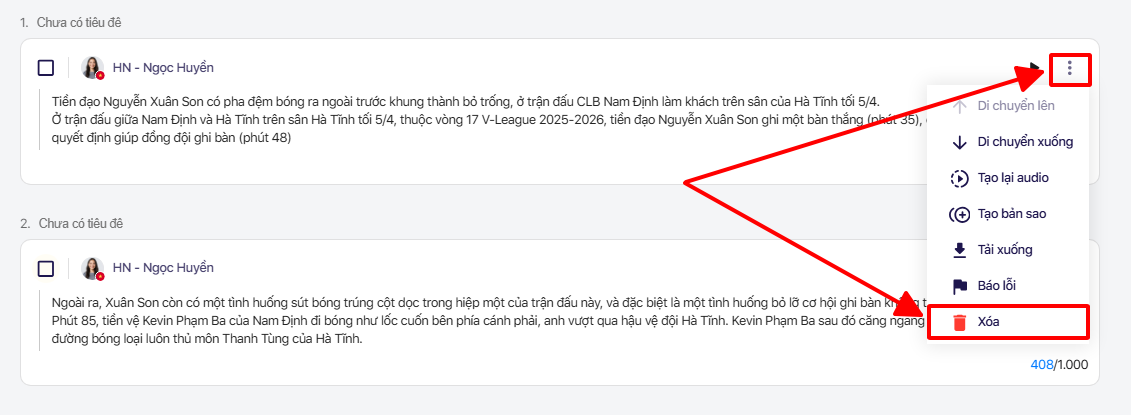
Trường hợp cần xóa các khối văn bản trong Dự án đó, chọn vào biểu tượng dấu  cạnh khối văn bản cần xóa sau đó chọn Xóa
*Lưu ý: Sau khi Đồng ý xóa Dự án/Khối văn bản, nội dung đã xóa sẽ không thể khôi phục được.*