> For the complete documentation index, see [llms.txt](https://help.vbee.vn/llms.txt). Markdown versions of documentation pages are available by appending `.md` to page URLs; this page is available as [Markdown](https://help.vbee.vn/huong-dan-su-dung/nhan-ban-giong-voice-cloning/chia-se-va-kiem-tien-voi-giong-cong-dong/quan-ly-kiem-tien.md).

# Quản lý kiếm tiền

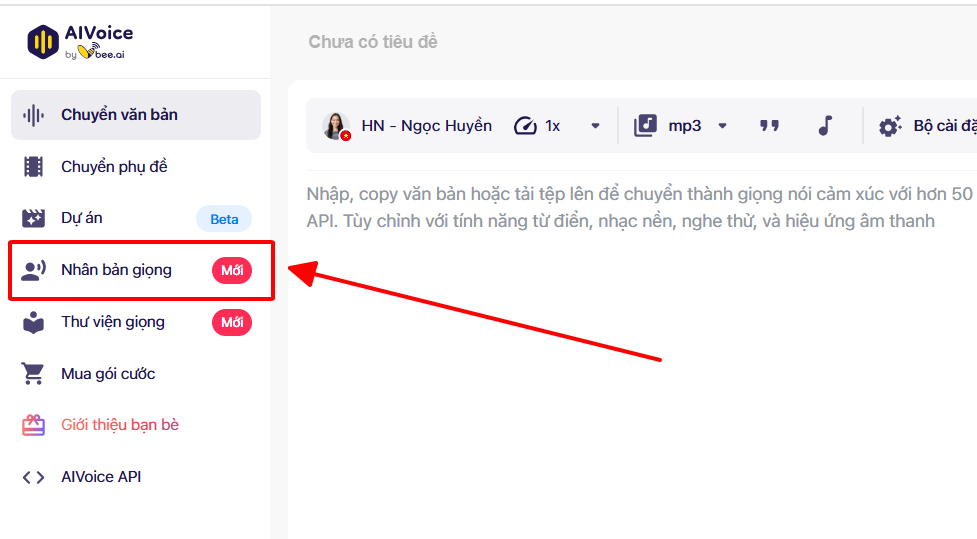
Khách hàng truy cập website <mark style="color:blue;">vbee.vn</mark> vào mục **Nhân bản giọng**

<figure><img src="/files/1g7nCLWOrWX63Ed5MXmi" alt="" width="563"><figcaption></figcaption></figure>

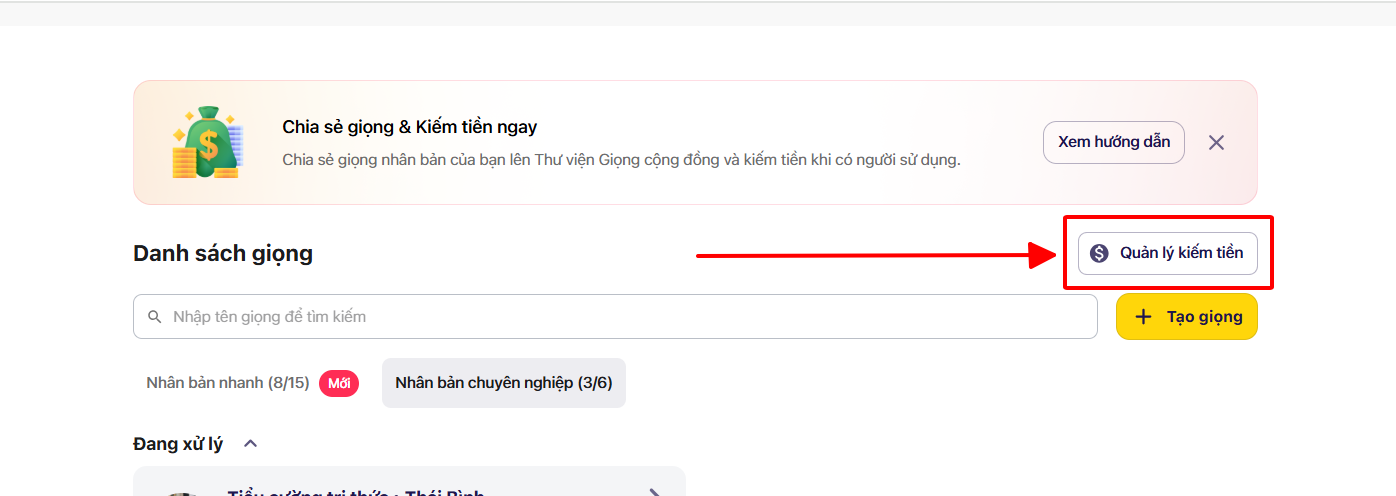
Sau đó chọn vào công cụ **Quản lý kiếm tiền**

<figure><img src="/files/dwY0hkpfCTLgSr8MYfCb" alt=""><figcaption></figcaption></figure>

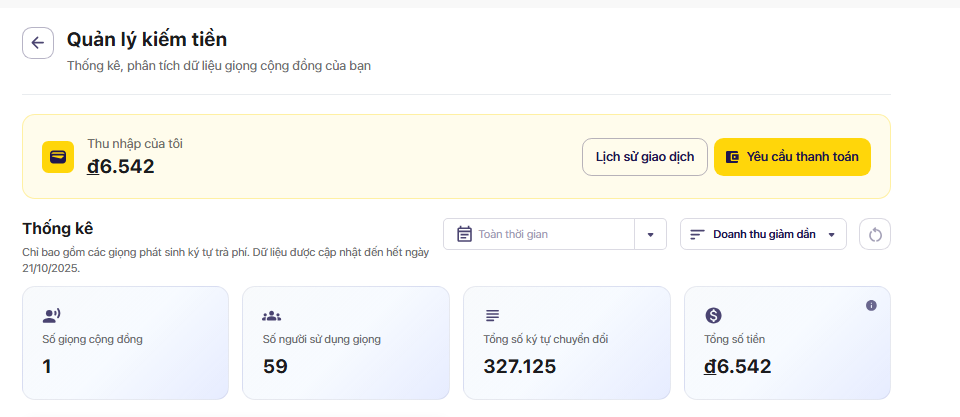
**Trang Quản lý kiếm tiền** giúp bạn theo dõi và phân tích tình trạng sử dụng giọng đọc cộng đồng của mình.\
Tại đây, bạn có thể:

* Xem **thu nhập tích lũy** từ giọng đọc.
* Kiểm tra **số người đã sử dụng giọng** và **tổng số ký tự chuyển đổi**.
* Biết được **doanh thu chi tiết** theo từng giọng.
* Theo dõi tiến độ để đạt mức **1.000.000đ** và yêu cầu thanh toán.

<figure><img src="/files/qZezdSKvwj9Oaiup5G1U" alt=""><figcaption></figcaption></figure>

### Yêu cầu thanh toán

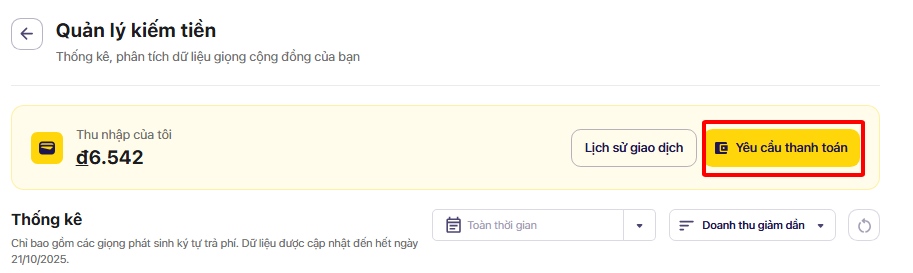
Khi thu nhập đạt đủ từ 1.000.000 VNĐ trở lên người dùng có thể thao tác rút tiền bằng thao tác **Yêu cầu thanh toán**

<figure><img src="/files/OghEprnkgewzc2SAtpu8" alt="" width="563"><figcaption></figcaption></figure>

Sau đó tiền hành điền các thông tin cá nhân theo hệ thống yêu cầu để tiến hành thủ tục rút tiền rối bấm **Gửi yêu cầu**. Yêu cầu thanh toán của người dùng sẽ được gửi tới công ty Vbee để kiểm tra và tiến hành chi trả.

<div><figure><img src="/files/NnahjIYHgT98y6Wxq3gI" alt="" width="366"><figcaption></figcaption></figure> <figure><img src="/files/yA0zWG8MAw6zifavt8Wc" alt="" width="366"><figcaption></figcaption></figure></div>

### Lịch sử giao dịch

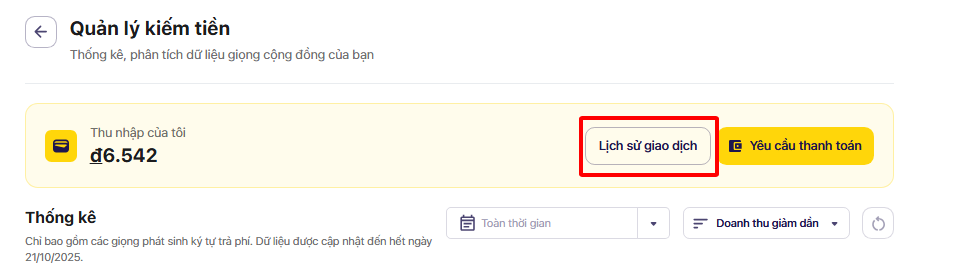
Người dùng có thể dễ dàng theo dõi trạng thái yêu cầu thanh toán và phần thưởng nhận được, giúp việc quản lý thu nhập minh bạch và thuận tiện hơn bằng cách chọn vào **Lịch sử giao dịch**

<figure><img src="/files/Z4btqfdTLbLRDdFTwqt5" alt="" width="563"><figcaption></figcaption></figure>

Sau đó hệ thống sẽ hiển thị toàn bộ các giao dịch người dùng đã rút tiền kèm theo trạng thái cụ thể của từng giao dịch<br>

<figure><img src="/files/rom8Act6rflFfoDFQwlQ" alt=""><figcaption></figcaption></figure>


---

# Agent Instructions
This documentation is published with GitBook. GitBook is the documentation platform designed so that both humans and AI agents can read, navigate, and reason over technical content effectively. Learn more at gitbook.com.

## Querying This Documentation
If you need additional information that is not directly available in this page, you can query the documentation dynamically by asking a question.

Perform an HTTP GET request on the current page URL with the `ask` query parameter, and the optional `goal` query parameter:

```
GET https://help.vbee.vn/huong-dan-su-dung/nhan-ban-giong-voice-cloning/chia-se-va-kiem-tien-voi-giong-cong-dong/quan-ly-kiem-tien.md?ask=<question>&goal=<endgoal>
```

`ask` is the immediate question: it should be specific, self-contained, and written in natural language.
`goal` is optional and describes the broader end goal you are ultimately trying to accomplish on behalf of the user. GitBook uses it to tailor the answer towards what is most useful for that goal.

The response will contain a direct answer to the question and relevant excerpts and sources from the documentation.

Use this mechanism when the answer is not explicitly present in the current page, you need clarification or additional context, or you want to retrieve related documentation sections.