> For the complete documentation index, see [llms.txt](https://help.vbee.vn/llms.txt). Markdown versions of documentation pages are available by appending `.md` to page URLs; this page is available as [Markdown](https://help.vbee.vn/huong-dan-su-dung/ung-dung-vbee-ai-voice/thanh-toan/mua-them-diem.md).
# Mua thêm điểm
Hệ thống cho phép người dùng mua thêm điểm khi đang có gói cước trả phí (Đang sử dụng gói nào sẽ mua thêm điểm ở gói đó). Giá bán phụ thuộc vào từng gói cước đang sở hữu.
Có 2 cách để người dùng có thể thao tác mua thêm điểm sử dụng. \
**Cách 1:** Truy cập mục **Gói cước**, tại gói cước đang sử dụng chọn vào **Mua thêm điểm**
**Cách 2:** Truy cập mục **Hồ sơ** sau đó chọn **Gói cước của tôi,** chọn **Mua thêm điểm**
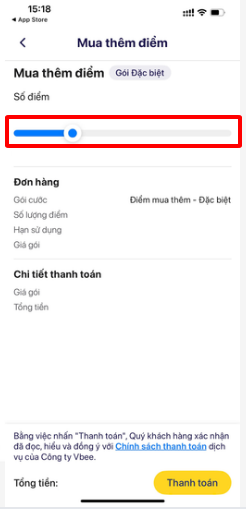
Sau đó giaop diện Mua thêm điểm sẽ hiển thị như hình dưới:
-> **Di chuyển thanh trượt**  để lựa chọn số lượng điểm mua thêm.
-> Kiểm tra tổng tiền và khuyến mại (nếu có) rồi tiến hành **Thanh toán**.